Better Dash | RPG Maker MZ Plugin
A downloadable tool
"Better Dash" enhances the default RPG Maker MZ dash system with a comprehensive stamina management system, dynamic visual effects, and improved player feedback. Transform basic dashing into an engaging gameplay mechanic with trails, particles, character tilting, and customizable stamina depletion.

Key Features
⚡ Dynamic Stamina System
- Configurable drain and regeneration - Adjust stamina rates to your liking
- Cooldown mechanic - Requires full recharge after depletion
- Variable-based max stamina - Link to game variables for dynamic progression
- Plugin command control - Enable/disable system on the fly
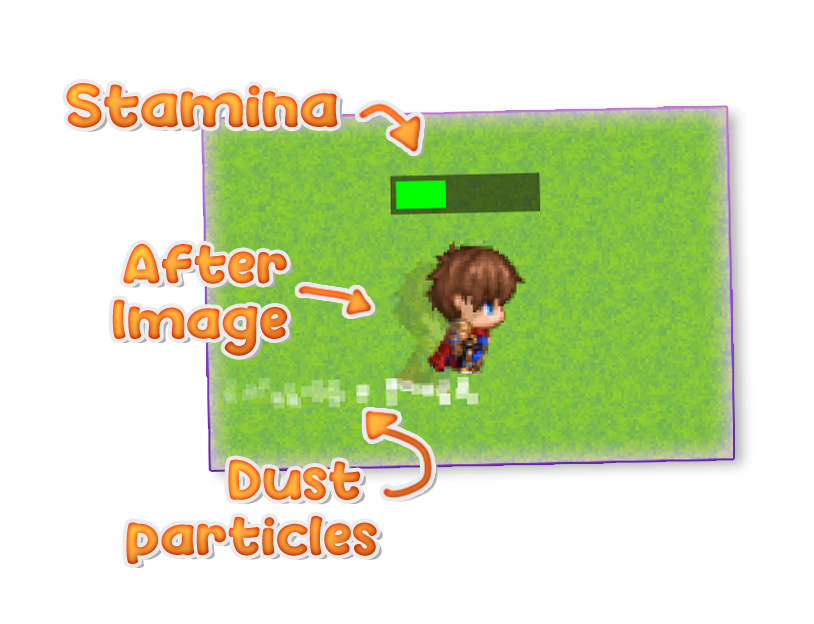
- Visual gauge with fade effects - Shows current stamina in real-time
🎨 Customizable Stamina Gauge
- Simple Bar - Colored bar with configurable size and color
- Custom Images - Use your own background and fill graphics
- Fixed Position - Static screen placement
- Follow Player - Gauge floats above player character
- Auto-fade - Fades out when not dashing for clean UI
💨 Visual Effects
- Dust Particles - Spawns behind player while dashing
- Afterimage Trails - Fading ghostly copies of the character
- Character Tilt - Sprite tilts 5° when dashing sideways
- Camera scroll compatible - Effects stay in world position
- Movement-based - Only appears when actually moving
🔊 Sound & Interaction
- Customizable dash sound effect
- Dash Switch for event triggers
- System Enable Switch for master control
- Works with player and followers
Plugin Parameters
System Settings
System Enable Switch ID
- Default: 0 (always enabled)
- Switch ID to control the entire Better Dash system
- When OFF: All features disabled, reverts to default dash
Dash Switch ID
- Default: 0 (disabled)
- Switch automatically turns ON while dashing
- Use in events to react to player dash state
Stamina Settings
Enable Stamina System
- Default: ON
- Master toggle for stamina mechanics
Max Stamina Type
- Default: Fixed Value
- Options: Fixed Value, Game Variable
- Link to a variable for dynamic max stamina
Max Stamina (Fixed)
- Default: 100
- Maximum stamina value when using fixed type
Max Stamina Variable ID
- Default: 0
- Variable ID for max stamina when using variable type
- Useful for upgrades, equipment, or level-based systems
Stamina Drain Rate
- Default: 2.00
- How much stamina drains per frame while dashing
Stamina Regen Rate
- Default: 1.00
- How much stamina regenerates per frame when not dashing
Require Full Recharge
- Default: ON
- Stamina must fully recharge before dashing again after depletion
- Prevents infinite micro-dashing
Gauge Settings
Show Stamina Bar
- Default: ON
- Display the stamina gauge on screen
Use Image Gauge
- Default: OFF
- Use custom images instead of simple colored bar
- Images should be placed in
img/system/folder
Gauge Background Image
- Default:
dash_gauge_bg - Filename for background gauge image (without extension)
Gauge Fill Image
- Default:
dash_gauge_fill - Filename for fill gauge image (without extension)
- Clipped horizontally based on current stamina percentage
Position Type
- Default: Fixed
- Options: Fixed, Above Player
- Fixed: Static screen position
- Above Player: Follows player with offset
X Position
- Default: 10 px
- Horizontal position (fixed position type only)
Y Position
- Default: 10 px
- Vertical position (fixed position type only)
Offset Y
- Default: -60 px
- Vertical offset above player (above_player position type only)
Bar Width
- Default: 200 px
- Width of stamina bar (simple bar only)
Bar Height
- Default: 10 px
- Height of stamina bar (simple bar only)
Bar Color
- Default:
<span class="inline-block w-3 h-3 border-[0.5px] border-border-200 rounded flex-shrink-0 shadow-sm mr-1 align-middle" style="background-color: #00ff00;"></span>#00ff00(green) - Color of stamina bar (simple bar only, hex format)
Fade When Not Dashing
- Default: ON
- Gauge fades out when player stops dashing
Gauge Fade Speed
- Default: 15
- Speed of fade in/out animation (higher = faster)
Particle Settings
Enable Dust Particles
- Default: ON
- Show particle effects while dashing
Particle Count
- Default: 3
- Number of particles spawned per frame
Particle Lifetime
- Default: 20 frames
- How long particles persist before fading out
Only While Moving
- Default: ON
- Particles only spawn when actually moving
- Prevents particle spam when standing still
Trail Settings
Enable Trail Effect
- Default: ON
- Show afterimage trail while dashing
Trail Opacity
- Default: 100
- Range: 0-255
- Starting opacity of trail images
Trail Fade Speed
- Default: 15
- How quickly trails fade out
Trail Interval
- Default: 4 frames
- Frames between each trail spawn
Apply to Followers
- Default: ON
- Apply trail effect to follower characters
Sound Settings
Enable Dash Sound
- Default: ON
- Play sound effect when starting to dash
Dash Sound File
- Default:
Run - SE filename from
audio/se/folder (without extension)
Dash Sound Volume
- Default: 50
- Range: 0-100
- Volume of dash sound effect
Tilt Settings
Enable Tilt
- Default: ON
- Tilt character sprite while dashing
Tilt Angle
- Default: 5.0 degrees
- Angle of character tilt (positive values)
- Only applies when moving left/right
Apply to Followers
- Default: ON
- Apply tilt effect to follower characters
Plugin Commands
Enable Stamina System
- Turns on the stamina system dynamically
- Useful for abilities or temporary power-ups
Disable Stamina System
- Turns off the stamina system dynamically
- Automatically resets stamina to maximum
Set Stamina
- Set current stamina to a specific value
- Parameter: Stamina Value (number, min: 0)
- Useful for events, cutscenes, or scripted moments
Usage Examples
Dynamic Stamina with Variables
Set Max Stamina Type to "Game Variable" and link it to a variable. Update the variable through equipment changes (Light Armor = 120 stamina, Heavy Armor = 80 stamina), level progression (50 + Level × 5), character stats (Agility × 2), or temporary buffs from items or skills.
Event Integration
Use the Dash Switch to trigger events such as pressure plates that only activate when dashing, speed-based puzzles, special interactions requiring momentum, or enemy AI that reacts to player sprint.
Upgrade Systems
Combine Plugin Commands with your progression system: unlock infinite dash by disabling the Stamina System, create stamina potions that Set Stamina to maximum, or provide temporary boost items that Set Stamina above normal max.
Technical Notes
- All visual effects use world coordinates and work correctly with camera scrolling
- Smooth interpolation prevents flickering on character tilt
- Particles and trails are properly cleaned up to prevent memory leaks
- Compatible with default MZ controls (keyboard, gamepad, touch)
- System Enable Switch allows complete feature toggling mid-game
Purchase
In order to download this tool you must purchase it at or above the minimum price of $5 USD. You will get access to the following files: