Light Puzzle | RPG Maker MZ Plugin
A downloadable tool
Perfeito! Vou adaptar a descrição para refletir todas as mudanças que fizemos:
Light Puzzle is a memory minigame plugin inspired by the classic electronic game. Players watch a sequence of colored lamps light up and must repeat the sequence from memory. Each successful round adds more lamps to the sequence, steadily increasing the difficulty.

Features
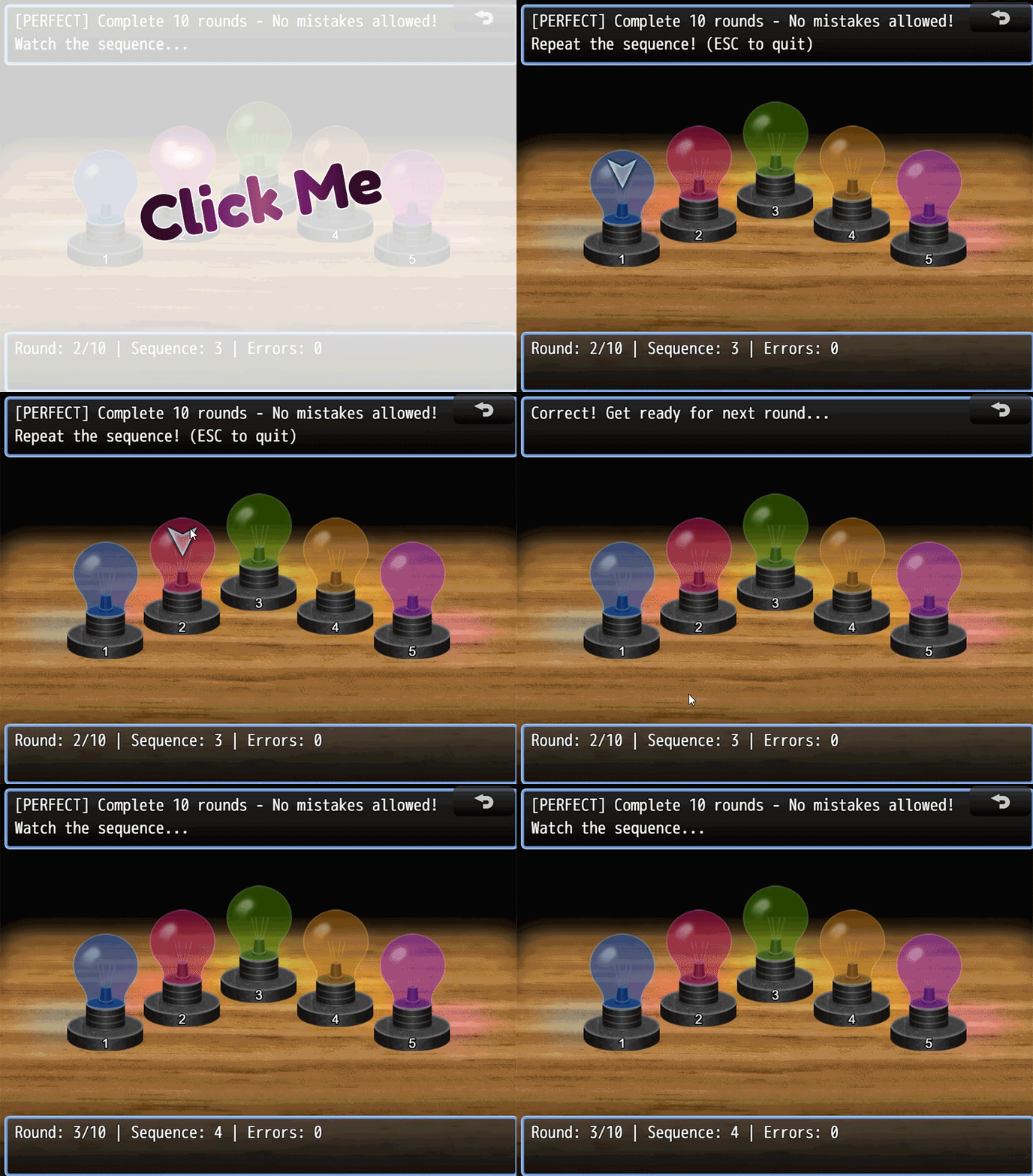
- Three distinct game modes: Practice, Challenge, and Perfect
- Five colored lamps arranged in an elegant arc formation
- Keyboard, mouse, and touch support with hover detection
- Customizable sequence display speed and growth rate
- Centered background without stretching
- Clean two-window interface showing objectives and stats
- Variable and switch integration
- Automatic scoring system
- Compatible with RPG Maker MZ
Plugin Parameters
Visual Settings
Display Speed
- Default: 35 frames
- Range: 15–120 frames
- Controls how long each lamp lights up during the sequence
- Lower values = faster and harder
- Higher values = slower and easier
Selector Pulse Speed
- Default: 3
- Range: 1–10
- Controls the pulse animation speed of the selector
- Higher values = faster pulse
Lamp Glow Intensity
- Default: 0.3
- Range: 0–1
- Controls the glow effect intensity on lamps
Show Keyboard Hints
- Default: ON
- Displays number hints (1–5) below lamps for quick selection
Enable Animations
- Default: ON
- Enables smooth animations for selector and lamps
Gameplay Settings
Challenge Mode Attempts
- Default: 3 attempts per round
- Range: 1–10
- Number of attempts allowed per round in Challenge Mode
Practice Growth Rate
- Default: 1 lamp per round
- Range: 1–3
- How many lamps to add each round in Practice Mode
Sound Effects
Configure unique sound effects for:
- Blue Lamp
- Green Lamp
- Purple Lamp
- Red Lamp
- Yellow Lamp
- Error
- Success
- Complete
Debug Settings
Debug Mode
- Default: OFF
- Enables console logging for troubleshooting
Game Modes
Practice Mode
- Endless mode that continues until the player fails
- One mistake = Game Over - No second chances!
- Sequence grows by configurable rate each round (default: 1 lamp)
- Score is based on rounds completed
- Ideal for learning patterns and high-score challenges
Challenge Mode
- Complete a fixed number of rounds
- Multiple attempts per round (configurable, default: 3)
- Most forgiving mode - mistakes cost attempts, not the game
- Sequence grows by 1 lamp each round
- Score reflects rounds completed
- Ideal for casual play and quest objectives
Perfect Mode
- Complete all rounds with zero mistakes
- One mistake = Instant Game Over - Hardcore mode!
- Sequence grows by 1 lamp each round
- Uses a success switch instead of score variable
- Only activates switch if ALL rounds completed perfectly
- Ideal for achievements and expert challenges
Plugin Commands (RPG Maker MZ)
Practice Mode
- Initial Sequence Length (1–10)
- Score Variable
Challenge Mode
- Total Rounds (1–20)
- Initial Sequence Length (1–10)
- Score Variable
Perfect Mode
- Total Rounds (1–20)
- Initial Sequence Length (1–10)
- Success Switch
How to Play
Objective
Repeat the sequence of lamps in the same order shown by the game.
Gameplay Flow
- The game displays the current mode objective and instructions
- Watch as the lamp sequence lights up
- Repeat the sequence in the correct order
- If correct, proceed to the next round with a longer sequence
- If incorrect, outcome depends on the selected mode
Interface
Top Window
- Shows current mode and objective
- Displays phase-specific instructions
Bottom Window
- Round progress (current / total if applicable)
- Sequence length
- Attempts remaining (Challenge Mode only)
- Total errors
Controls
Keyboard
- Arrow Keys (← →) — Navigate between lamps
- Enter / Z — Activate selected lamp
- Escape / X — Exit during input phase
Mouse
- Hover — Selector automatically follows mouse cursor
- Left Click — Activate lamp under cursor
- Right Click — Exit game (same as ESC)
Touch
- Tap — Activate lamp directly
Required Assets
Place these images in img/pictures/:
lamp_bg.png— Background image (centered without resizing)lamp_blue_off.png/lamp_blue_on.pnglamp_green_off.png/lamp_green_on.pnglamp_purple_off.png/lamp_purple_on.pnglamp_red_off.png/lamp_red_on.pnglamp_yellow_off.png/lamp_yellow_on.pnglightpuzzle_select.png— Selection indicator
Tips
- Practice Mode: Great for warming up and learning patterns
- Challenge Mode: Perfect for main game integration with forgiving difficulty
- Perfect Mode: Ultimate test of memory and concentration
- Use the hover detection to quickly select lamps with your mouse
- Watch for the selector pulse animation during input phase
Purchase
In order to download this tool you must purchase it at or above the minimum price of $5 USD. You will get access to the following files: