Tile Flip Minigame - RPG Maker MV/MZ Plugin
A downloadable tool
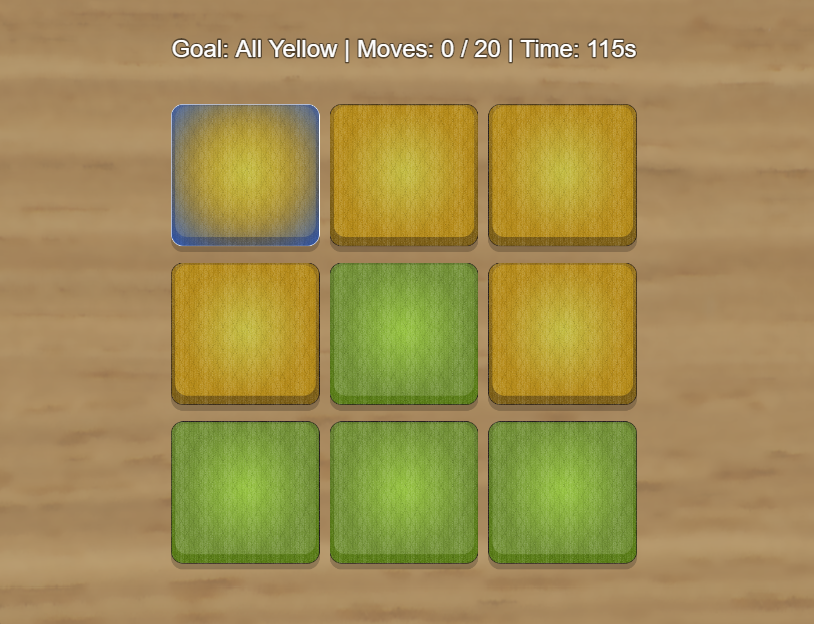
Tile Flip is a Lights Out–style puzzle minigame for RPG Maker MV/MZ. Click a tile to flip it and its adjacent tiles in a cross pattern. The goal is to make all tiles the same color.

Features
-
Classic Lights Out gameplay mechanics
-
Customizable grid sizes (3×3 to 6×6 or larger)
-
Two tile states with custom graphics
-
Adjustable difficulty through shuffle count
-
Optional time limits and move limits
-
Smooth flip animations
-
Keyboard and mouse/touch controls
-
Always solvable puzzles
-
Compatible with RPG Maker MV and MZ
Installation
Step 1: Install the Plugin
-
Download dracky_tileflip.js
-
Place it in your project’s
js/pluginsfolder -
Open the Plugin Manager in RPG Maker
-
Add the plugin to your project
Step 2: Prepare Graphics
Create the following image files and place them in img/pictures/:
Required files:
-
tile_state_a.png— First tile state (256×256 pixels) -
tile_state_b.png— Second tile state (256×256 pixels) -
tile_selector.png— Selection indicator (256×256 pixels) -
tile_bg.png— Background image (optional, full screen)
Design Tips
-
Use contrasting colors for state A and B (e.g., green vs. red, light vs. dark)
-
Keep designs simple and easily distinguishable
-
Add visual interest while maintaining clarity
Plugin Parameters
Visual Settings
Tile Size
-
Default: 256 pixels
-
Range: 64–512
Base size of each tile. Automatically scales to fit the screen.
Tile Spacing
-
Default: 10 pixels
-
Range: 0–50
Space between tiles in the grid.
Flip Animation Speed
-
Default: 10 frames
-
Range: 5–30
Duration of the flip animation. Lower values are faster; higher values are smoother.
Debug Settings
Debug Mode
-
Default: OFF
Enables console logging for troubleshooting.
Sound Effects
-
SE: Flip — Default:
Cursor2(played when flipping tiles) -
SE: Success — Default:
Item1(played when the puzzle is completed) -
SE: Fail — Default:
Buzzer1(played when the puzzle is failed) -
SE: Move Cursor — Default:
Cursor1(played when navigating with arrow keys)
Plugin Commands
RPG Maker MZ
Use the Classic Mode command with the following parameters:
Grid Size
Format: "4x4", "5x5", "3x4", etc.
(first number = columns, second number = rows)
Victory Goal
-
All State A — All tiles must be in state A
-
All State B — All tiles must be in state B
Goal Display Name
Custom text shown to the player (e.g., All Green, All Light)
Difficulty
Number of random flips used to shuffle the puzzle (1–50).
Higher values = more scrambled = harder.
Max Moves
Maximum allowed moves (0 = unlimited).
The player fails if the limit is exceeded.
Time Limit
Time in seconds (0 = unlimited).
The player fails if time runs out.
Success Switch
Switch turned ON when the puzzle is completed.
Fail Switch
Switch turned ON when the puzzle is failed.
Score Variable
Stores the number of moves used (lower is better).
RPG Maker MV
Use the Script Command to start the puzzle:
TileFlip.start({ gridSize: "4x4", goal: "A", goalName: "All Green", difficulty: 10, maxMoves: 0, timeLimit: 0, successSwitch: 1, failSwitch: 2, scoreVariable: 3 });
Script Parameters
gridSize
String in the format "CxR" (columns × rows).
Examples: "3x3", "4x4", "5x6".
goal
Defines the victory condition:
-
"A"— All tiles must be in state A -
"B"— All tiles must be in state B
goalName
Custom text displayed to the player describing the objective.
difficulty
Number of random flips used to shuffle the board (1–50).
Higher values create more complex puzzles.
maxMoves
Maximum number of allowed moves.
Use 0 for unlimited moves.
timeLimit
Time limit in seconds.
Use 0 for no time limit.
successSwitch
ID of the switch that will be turned ON when the puzzle is completed.
failSwitch
ID of the switch that will be turned ON if the puzzle fails.
scoreVariable
ID of the variable that stores the number of moves used
(lower values indicate better performance).
Notes
-
The puzzle is always guaranteed to be solvable.
-
Grid size, difficulty, and limits can be freely combined.
-
Keyboard, mouse, and touch input are fully supported.
-
The plugin works identically in RPG Maker MV and MZ, with different command interfaces.
Purchase
In order to download this tool you must purchase it at or above the minimum price of $5 USD. You will get access to the following files: