Wire Connection | RPG Maker MZ Plugin
A downloadable tool
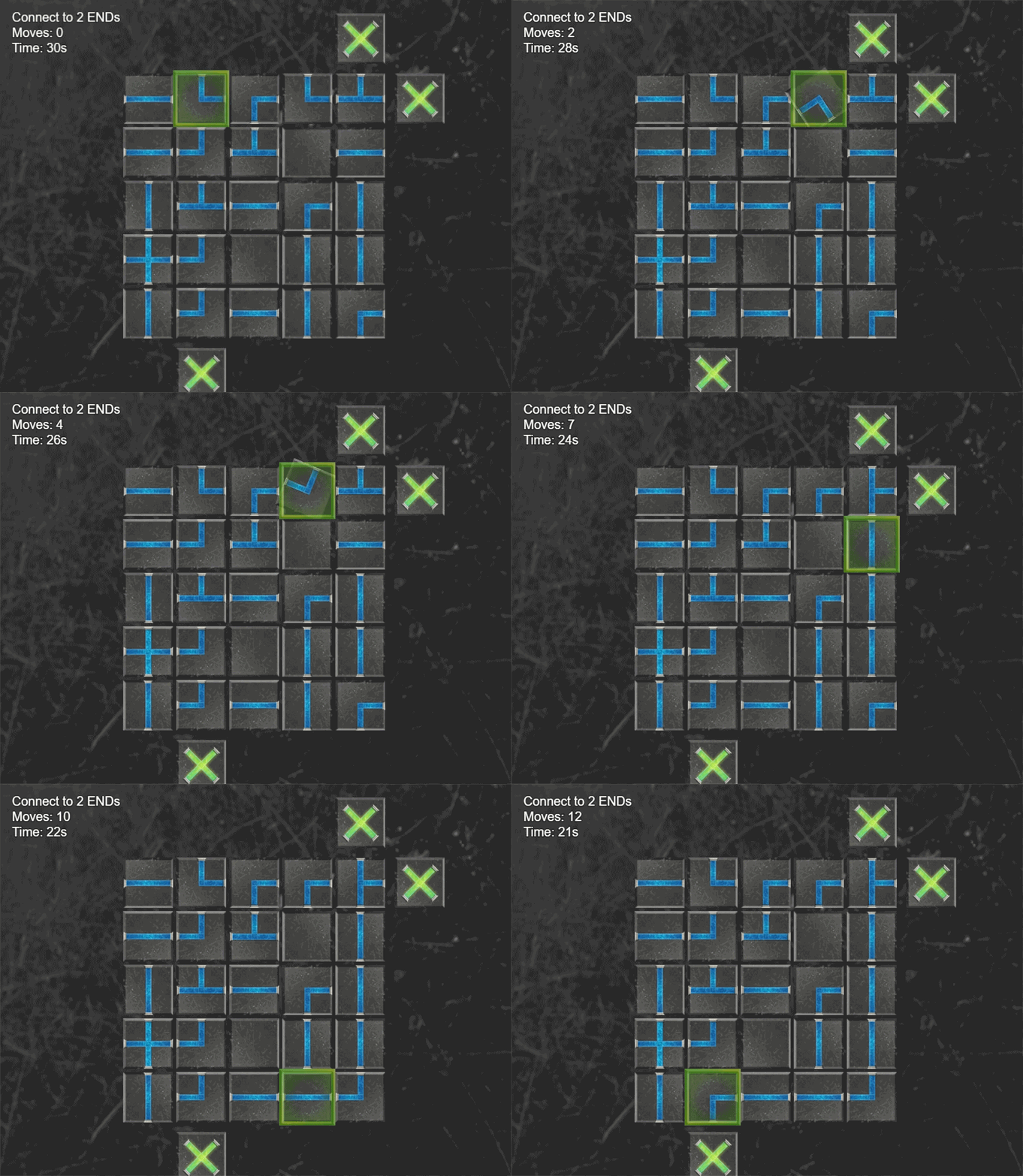
Connect the START point to one or more END points by rotating wire pieces to create a continuous path. Perfect for dungeon puzzles, hacking minigames, electrical circuits, or any connection-based challenge!

✨ Key Features
Core Gameplay
- Intuitive Controls - Click to rotate tiles 90° clockwise or use keyboard navigation
- Smart Generation - Every puzzle is guaranteed to be solvable using advanced A* pathfinding
- Multiple Difficulty Levels - Easy, Medium, and Hard with intelligent piece distribution
- Flexible Grid Sizes - From 4x4 to 7x7 (or custom dimensions)
- Multiple END Points - Challenge players to connect to 1, 2, or 3 destinations simultaneously
Game Mechanics
- 5 Piece Types - Straight, Corner, T-junction, Cross, and Empty tiles
- Dynamic Positioning - START/END markers can appear on any of the 4 edges
- Move Limits - Optional maximum moves for extra challenge
- Time Limits - Add time pressure with countdown timers
- Escape Control - Lock players into mandatory puzzles or allow voluntary exit
Integration
- Switch Integration - Trigger events on success or failure
- Variable Support - Store scores (move count) for rankings
- Custom Graphics - Full visual customization with your own art style
- Sound Effects - Customizable SFX for rotation, success, failure, and connections
📦 Installation
- Download
dracky_wireconnection.js - Place it in your project's
js/plugins/folder - Open Plugin Manager in RPG Maker MZ
- Add "dracky_wireconnection" to your plugin list
- Configure settings (tile size, sounds, etc.)
- Create your puzzle graphics (see Asset Requirements below)
🎨 Asset Requirements
Create these images (128x128 pixels) and place them in img/pictures/wireconnection/:
Required Assets:
Sample assets are provided.
- straight.png - Straight wire/pipe piece (draw facing UP)
- corner.png - L-shaped corner piece (draw facing UP and RIGHT)
- start.png - START marker (green recommended)
- end.png - END marker (red recommended)
- selector.png - Selection highlight/border
- t.png - T-junction piece
- cross.png - 4-way cross piece
- empty.png - Blocked/empty tile
- bg.png - Custom background
🎯 Usage
Basic Plugin Command
Open the Plugin Command menu and select:
Wire Connection → Classic Mode
Parameters:
| Parameter | Description | Default |
|---|---|---|
| Grid Size | Dimensions (e.g., "5x5", "7x7") | 5x5 |
| Difficulty | Easy (1), Medium (2), Hard (3) | Medium |
| Max Moves | Move limit (0 = unlimited) | 0 |
| Time Limit | Seconds (0 = unlimited) | 0 |
| Success Switch | Switch ID to activate on win | 1 |
| Fail Switch | Switch ID to activate on loss | 2 |
| Score Variable | Variable to store move count | 1 |
| Allow Escape | Can player exit early? | true |
| Number of Ends | How many END points (1-3) | 1 |
Controls
Keyboard:
- Arrow Keys - Navigate grid
- Enter/Z/Space - Rotate selected tile
- ESC/X - Exit puzzle (if allowed)
Mouse:
- Left Click - Rotate tile
- Right Click - Exit puzzle (if allowed)
Debug Mode:
- Q Key - Reveal solution (when Debug Mode enabled)
⚙️ Plugin Settings
Configure these in the Plugin Manager:
Visual Settings:
- Tile Size - Size of each piece (64-512px, default: 128)
- Tile Spacing - Gap between pieces (0-50px, default: 5)
- Rotation Speed - Animation speed (3-30 frames, default: 8)
Sound Effects:
- SE: Rotate - When rotating a tile
- SE: Success - Puzzle completed
- SE: Fail - Puzzle failed
- SE: Move - Cursor movement
- SE: Connect - Path successfully connected
Debug:
- Debug Mode - Enable console logging and solution reveal
Purchase
In order to download this tool you must purchase it at or above the minimum price of $5 USD. You will get access to the following files: